Need assistance? Call us: 1-800-663-4209



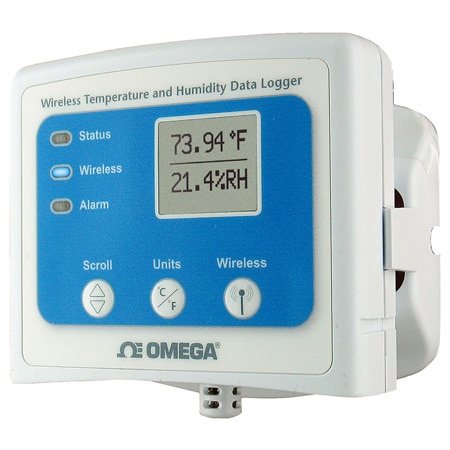
OM-CP-RFRHTEMP2000A-Logger
Wireless Temperature and Humidity Data Logger with Display
Models In Stock
- Wireless 2-Way Communication
- View Data in Real-Time
- 3 Year Battery Life
- Battery Life Indicator
OM-CP-RFRHTEMP2000A-Logger
From
$
496.17
Models In Stock


Product Overview
- Additional Features 1 Audible and LED Alarm Indicators
- Alarm Delay Programmable time delay
- Battery life up to 3 yr
- Battery Size and Type Li-ion, 9V
- Calibration Digital calibration through software
- Data Interface USB
- Data Interface Note USB to mini USB,250,000 baud for standalone operation or OM-CP-RFC1000-EXT required for wireless operation.
- Display Type LCD
- Height 24.1 mm
- Internal Channel Calibrated Accuracy Note ± 0.5°C (± 0.9°F),0 to 55°C(32 to 131°F)
- Internal Channel Response Time 10 min
- LED Indicators • Green LED blinks every 5 seconds to indicate unit is logging • Blue LED blinks every 15 seconds to indicate unit is in wireless mode • Red LED blinks every 1 second to indicate alarm condition.
- Length 76.2 mm
- Measurement Type Humidity, Temperature
- Memory 16128
- Number of Measurements 2
- Operating Humidity 0 to 95% RH
- Operating Temperature, Max 60 °C
- Operating Temperature, Min -20 °C
- Process Temperature, Max 60 °C
- Process Temperature, Min -20 °C
- Relative Humidity, Max 0.95
- Relative Humidity, Min 0%
- Relative Humidity Resolution 0.001
- Response Time Note 2 - 63% min
- Samples,Max 16128
- Sampling Rate 1 Hz (1 update/second)
- Sampling Rate Note One Reading every second up to one every 24 hours
- Series ID OM-CP-RFRHTEMP2000A-Logger
- Software Compatibility XP SP3/Vista/7 and 8 (32-bit and 64-bit)
- Supply Power Type Battery
- Time Accuracy ± 1 minute/month
- Weight 116 g
- Width 88.9 mm
- Wireless Band 2.405 - 2.48 GHz
- Wireless Receiver Sensitivity -95 dBm
Supported Applications
The OM-CP-RFRHTEMP2000A is a wireless temperature and humidity data logger with a digital display, designed for industrial or laboratory applications. Its external humidity and RTD-based temperature sensors, real-time data viewing and audible/LED alarm indicators make it suited to environments where conditions must be tracked continuously and out-of-limit events flagged.
- Supply chain storage facilities.
- Incubator monitoring.
- HVAC studies.
Operating Conditions & Performance
The logger measures across the following ranges:
- Temperature: -20 °C to 60 °C (-4 °F to 140 °F)
- Humidity: 0 % to 95 % RH
Temperature is resolved to 0.01 °C (0.02 °F) with a calibrated accuracy of ±0.5 °C (±0.9 °F) from 0 °C to 55 °C (32 °F to 131 °F) and a response time of 10 minutes free air. Humidity is resolved to 0.1 % RH with a calibrated accuracy of ±3.0 % RH, ±2.0 % RH typical at 25 °C (77 °F); [10 % to 90 % RH; 5 °C to 55 °C (41 °F to 131°F)], responding in 2 minutes to 63 % of change.
Wireless communication uses a 2.45 GHz IEEE 802.15.4 ultra-low power wireless transceiver with fully bi-directional communication, operating in the ISM band 2.405 GHz to 2.48 GHz with +0 dBm typical output power and -95 dBm typical receiver sensitivity for the OM-CP-RFC1000-EXT. The wireless range is 610 m (2000 ft) maximum outdoors (line of sight unobstructed) and 152 m (500 ft) maximum indoors (typical urban).
The reading rate spans one reading every second up to one every 24 hours. Power is supplied by a user-replaceable 9 V lithium battery. The data logger weighs 116 g (4.1 oz) and measures 76.2 mm x 88.9 mm x 24.1 mm (3.0 in x 3.5 in x 0.95 in). The operating environment is -20 °C to 60 °C (-4 °F to 140 °F) at 0 % to 95 % RH non-condensing. The OM-CP-RFC1000-IP69K transceiver package is splash proof (IP69K).
Configuration Options
The logger itself connects by USB to mini USB at 250,000 baud for standalone operation, while wireless operation requires an OM-CP-RFC1000-EXT transceiver package. Capability differences across the lineup center on certification and the choice of transceiver:
- Calibration documentation: the OM-CP-RFRHTEMP2000A-CERT adds a NIST calibration certificate to the standard logger.
- Transceiver options: the OM-CP-RFC1000-EXT package is not CE approved, the OM-CP-RFC1000-EXT-EUR package is CE approved, and the OM-CP-RFC1000-IP69K package provides a splash proof (IP69K) transceiver.
- Battery: the OM-CP-BAT103 is the replacement 9 V lithium battery.
Key Product Differences
The series is ordered from the following models and accessories:
- OM-CP-RFRHTEMP2000A - wireless temperature and humidity data logger with LCD display.
- OM-CP-RFRHTEMP2000A-CERT - wireless temperature and humidity data logger with LCD display and NIST calibration certificate.
- OM-CP-RFC1000-EXT - wireless transceiver package includes RF transceiver, USB cable, Windows software and operator's manual (not CE approved).
- OM-CP-RFC1000-EXT-EUR - wireless transceiver package includes RF transceiver, USB cable, Windows software and operator's manual (CE approved).
- OM-CP-RFC1000-IP69K - splash proof (IP69K) wireless transceiver package includes RF transceiver, USB cable, Windows software and operator's manual (not CE approved).
- OM-CP-BAT103 - replacement 9 V lithium battery.
Software & Drivers


Show Ratings & Reviews
Rated 5 out of
5
by
Anonymous from
Good quality and performance
Equipment do what is designed for and it's very good
Date published: 2021-12-25
Can the channel be changed to match the transiver?
Hello, thank you for your questions. Yes, the manual shows the following instructions:
To program the channel on the OM-CP-RFRHTemp2000A data logger, start by
switching the wireless mode to OFF by holding down the Wireless button on the data logger for 5 seconds.
1. Use the USB Cable, plug the USB end of the cable into an available USB port on the PC.
2. Plug the opposite end of the cable into the communication port on the OM-CP-RFRHTemp2000A.
3. Open the Omega data logger Software. Locate and select the OM-CP-RFRHTemp2000A in the Connect
Devices panel.
4. In the Device tab, click the Properties icon. The Properties screen will display information about the
device including Wireless setting.
5. Under the Wireless tab, select a desired channel (11-25) that will match with the OM-CP-RFC1000-EXT.
Save all changes, disconnect the data logger, and return the device to wireless mode by holding down
the Wireless button for 5 seconds.
Date published: 2024-10-29
Can this be used right out of the box and data can be collected with USB or do I need to purchase the wireless transceiver?
Thank you for your question. If you are just using device as a logger and not wireless nothing else is needed except software which is free download from the product page.
Date published: 2020-07-11
Can I find this equipment with a NIST certification?
Thank you for your question. The logger is supplied with a certification.
Date published: 2026-06-03
Does this come with a calibration certificate?
Hello, thank you for your question. Yes, calibration certificate is included with this logger.
Date published: 2026-03-27
Can this be calibrated by hand or does it need to be sent out for calibration?
Though the unit can be calibrated by the user through the software we highly recommend sending it back if user does not have proper calibration equipment.
Date published: 2020-06-21
Does this product come with thermocouples or do those need to be purchased separately.
Hello, thank you for your question. This logger has internal sensors for temperature and humidity, it does not accept thermocouple inputs. If you are looking for a thermocouple logger version of this, you can take a look at the OM-CP-RFTCTEMP2000A. It comes with a complementary thermocouple, but you can also buy a different one if needed for your application.
Date published: 2023-08-17
Can this unit be powered by a 120v power outlet instead of using the 9V battery?
Hello, thank you for your question. This logger can only be powered with a 9Vdc battery, there is no option for AC.
Date published: 2025-12-09
I need to setup this device to start and stop recording at perticular times in a day. The start function works, however the stop forkflow has an issue. the status says its stop, but it still shows running at the top.
Thank you for your question. This would have to be reviewed by DAS Engr- please e-mail DAS@OMEGA.COM with your issues.
Date published: 2020-04-03