Need assistance? Call us: 1-800-663-4209



DP600A
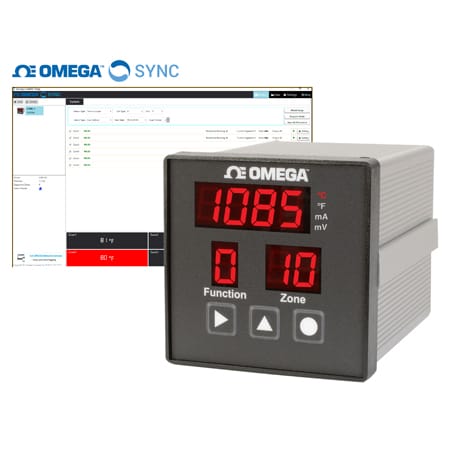
Universal 6/12 Channel 1/4 DIN Panel Meter, Universal Input
- Universal TC, RTD and Process Inputs Firmware Selectable
- User Programmable Alarms Individually Settable per Channel
- Adjustable Scan Time: 400 mS Max Scan Rate per Channel
- 2 User Assignable Alarm Relays
DP600A
From
C$
1,592.88

Product Overview
- A/D Conversion 24-bit Sigma Delta
- Alarm modes High/Low, Latch/Unlatch, Low
- Cutout Dimensions 92 × 92 mm
- Data Interface RS232, RS485
- Data Interface Note RS232 and RS485 (User Selectable) Up to 115.2k baud Modbus Protocol (RTU)
- Diameter 135 mm
- Display Size 21 mm (.82 in)
- Display Type 4 Digit LED
- Display Type Note 4-digit, 7-segment LED; red, 21 mm (0.83), 1 to 40s
- Form factor 1/4 DIN
- Height 95 mm
- Input Control Signal 4 to 20 mA, 0 to 1 V
- Input Type Thermocouple, RTD, mA, Voltage
- Input Type Note Input Types: TC: J, K, T, E, R, S, B, C, N RTD: 2 or 3 wire PT100 0.00385 CU10 0.00427 NI120 0.00672 1RTD 3 Wire 6 channels for all models
- Material Construction Option N/A
- Measuring Range Process Voltage: 0 to 1000 mV Process Current: 0 to 24.00 mA Type J: -150 to 1200°C Type K: -150 to 1372°C Type T: -150 to 400°C Type E: -150 to 1000°C Type R: -50 to 1788°C Type S: -50 to 1768°C Type B: 150 to 1820°C Type C: 0 to 2320°C Type N: -150 to 1300°C Pt RTD: 200 to 850°C Cu RTD: -200 to 260°C Ni RTD: -80 to 260°C
- Number of Relays 2
- Operating Temperature, Max 70 °C
- Operating Temperature, Min -20 °C
- Panel Depth 140 mm
- Power Consumption 3 W
- Resolution 1°, 1 mV, 0.01 mA
- Retransmission/Analog Output 2 Relays
- Sampling Rate 2.5 Hz (2.5 updates/second)
- Scan Rate 400 ms
- Series ID DP600A
- Storage Temperature, Max 85 °C
- Storage Temperature, Min -40 °C
- Supply Power Note Input Power: AC Models: 120/240 Vac; 50/60 Hz DC Models: 9 to 36 Vdc 3 watts maximum
- Thermocouple Type J, K, T, E, N, R, S, B, C
- Weight 725 g
- Width 95 mm
Supported Applications
The Omega DP600A series (models DP606A and DP612A) provides a flexible, easy-to-use solution for temperature and process measurement in multi-zone environments. Designed as a universal input meter, the series supports monitoring of up to 6 or 12 independent zones within a single rugged ¼ DIN aluminum housing.
Documented applications include:
- Temperature Monitoring: Sequential scanning and display of multiple thermocouple (Types J, K, T, E, R, S, B, C, N) or RTD inputs (Pt 100, Ni 120, Cu 10).
- Process Measurement: Monitoring DC voltage signals ranging from 0–1 Vdc and DC current signals ranging from 0–24 mA.
The display cycles through each zone sequentially to show readings. High and low alarms with SPDT relay outputs are available for monitoring purposes, allowing the unit to signal alarm conditions based on configured thresholds.
Operating Conditions & Performance
The DP600A series operates within a defined performance envelope suitable for industrial panel mounting. All zones are scanned at a 400ms rate. The display resolution is specified as 4-digit.
Input Accuracy:
- Thermocouple: ±0.5% of reading or ±1°C, whichever is greater
- RTD: ±0.5% of reading or ±1°C, whichever is greater
- Voltage: ±0.5% of reading
- Current: ±0.5% of reading
Power Supply:
- Universal AC: 90–240 Vac
- Isolated DC Option: 9–36 Vdc (Class III for DC power option)
The series is designed with a panel cutout dimension of 92mm x 92mm. Electrical safety and compliance certifications include CE, cULus, UL 61010:2010 Electrical Safety Requirements, IEC 947-1 and 947-3, EN61010 (for 115/230 AC power options), and Class III for the DC power option.
Configuration Options
The series offers configurable dimensions across channel count, sensor type, output signals, and communication protocols. The DP606A supports 6 independent zones, while the DP612A supports up to 12 zones (with a limitation that 3-wire RTD is limited to 6 zones on all models).
Configurable Inputs:
- Sensor Types: Thermocouple, RTD (2 or 3 wire), DC Voltage, DC Current
- Process Units: °C, °F, mA, mV
- Alarm Configuration: HI, LO, or HI/LO per relay
Rear Panel Connections:
- Power In: Main power input (9-pin connector for AC models; rear panel terminals for DC options)
- Relay Out: Two SPDT relay outputs configurable for alarm functions
- Comm: Serial communication port (RS232 or RS485 user-selectable using Modbus RTU protocol)
- Input: Process input connections labeled Z1–Z12
Communication & Control Options:
- User-selectable serial interface (RS232 or RS485) with configurable Baud Rate, Data Bits, Parity, and Stop Bits.
- Modbus RTU protocol support including Function Codes for Read Coils (0x01), Read Holding Registers (0x03), Write Single Register (0x06), and Write Multiple Registers (0x10).
- Password protection to prevent front panel tampering of configuration settings.
Key Product Differences
The DP600A series is distinguished by channel count and power supply options. The model number guide indicates variants such as DP606A/DP612A - <Model Variant> - <Configuration Options>.
- Channel Count: DP606A models provide 6 zones. DP612A models provide up to 12 zones.
- Power Supply Variants: Models are available with standard AC power (90–240 Vac) or an isolated DC option (9–36 Vdc), indicated by the "-DC" suffix in part numbers such as DP606A-DC and DP612A-DC.
- RTD Configuration: While 12-channel models support up to 12 inputs, the use of 3-wire RTDs is limited to 6 zones across all model variants. For 3-wire RTD configurations on 12-zone units, common wires must be connected to + terminals of both upper (Z1–Z6) and lower (Z7–Z12) input boards.
PDFs & Manuals
Software & Drivers



Show Ratings & Reviews
Rated 5 out of
5
by
jastew358 from
Universal 6/12 panel meter
This product is a great addition to our machine safety; easy to use and consistent
Date published: 2020-12-29
I was hoping to connect the meter to a pc to log data in conjunction with the OEM software. Is this possible? If so, where could I find the wiring diagram for the serial connection? I've looked in the manual but cannot find any specifics for this wiring.
The 3 terminal connector marked serial is where you make your communication connection. Pin #1 code B is your Transmit (TX), pin #2 code A is your receive (RX) and pin #3 is the RTN connection. You can connect directly to your PC's Comm port or use a OM-CONV-USB and go into a USB input.
Date published: 2023-12-12
Are there any examples of how to communicate with modbus using Labview? (i.e. an instruction to read temperature through visa)
Thank you for the inquiry. We do not have labview examples unfortunately. But the modbus register assignments and details are given in the manual;
https://assets.omega.com/manuals/DP600A_Manual.zip
Best regards
OMEGA
Date published: 2020-01-14
Should the controller automatically read multiple temperatures from multiple thermocouples after installation or is there a setting I am missing?
On the DP606A there should be one temperature displayed per active zone with a Thermocouple input. Function 2 sets which zones are active. If you have further questions contact the Temperature Engineering group at temp@omega.com.
Date published: 2022-09-22
I am trying to communicate between my PC and this controller through labview, but have trouble sending data. Are there any examples of modbus instructions using visa available? (i.e. how to read temperature or change between Fahrenheit/Celsius)
Thanks again 1anh21.
We do not have labview examples but modbus details are provided in main manual linked here;
https://assets.omega.com/manuals/DP600A_Manual.zip
Best regards
OMEGA
Date published: 2020-01-14
looking for DP612A Panel meter Operating and set up instruction <we have purchased last week ,
Thank you for your inquiry! You can find the manual in the "Manuals" tab under Product Specs.
Date published: 2021-07-08
Would like to know if there is a Modus register that can be used to stop the automatic temperature values loop and just show the temperature value of a specific sensor.
Hi guillermoe
Thank you for the inquiry. The necessary commands were not brought out to the modbus registers.
Best regards
OMEGA
Date published: 2021-09-28
Why even use RTD, the accuracy still ±1 degree C, RTD itself should be within ±0.5 degree C between 0 to 100 C, can the Controller maintain the temperature measurement within 0.5 degree C accuracy?
Thank you for your inquiry. The accuracy for the RTD Input is ±1°C. You still need to add the accuracy of the RTD itself to the overall accuracy.
Date published: 2022-05-16