Besoin d'aide? Appelez-nous: 1-800-663-4209



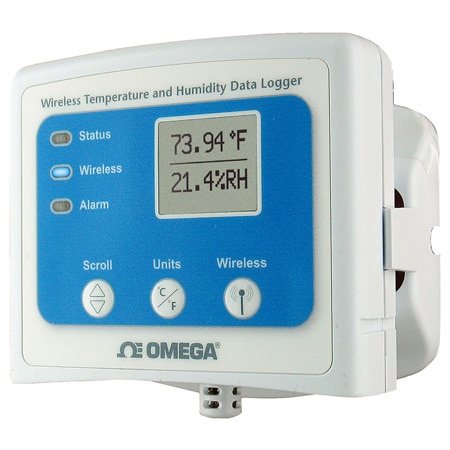
OM-CP-RFRHTEMP2000A-Logger
Enregistreur de données sans fil de température et d'humidité avec affichage
- Communication bidirectionnelle sans fil
- Affichage des données en temps réel
- Autonomie de 3 ans
- Indicateur d'autonomie
OM-CP-RFRHTEMP2000A-Logger
À partir de
C$
654.97


Aperçu du produit
- Fonctions supplémentaires 1 Indicateurs d'alarme sonores et LED
- Retard de l'alarme Temporisation programmable
- Autonomie de la batterie jusqu'à 3 ans
- Taille et type de batterie Li-ion ; 9 V
- Étalonnage Étalonnage numérique via logiciel
- Interface de données USB
- Remarque sur l'interface de données USB vers mini USB, 250 000 bauds pour fonctionnement autonome ou OM-CP-RFC1000-EXT requis pour fonctionnement sans fil.
- Type d'affichage Écran LCD
- Hauteur 24.1 mm
- Précision étalonnée du canal interne Remarque ± 0,5 °C (± 0,9 °F), 0 à 55 °C (32 à 131 °F)
- Temps de réponse du canal interne 10 min
- Indicateurs LED La LED verte clignote toutes les 5 secondes pour signaler le mode enregistrement, la LED bleue toutes les 15 secondes pour le mode sans fil et la LED rouge chaque seconde pour indiquer une condition d’alarme.
- Longueur 76.2 mm
- Type de mesure Humidité ; température
- Mémoire 16128
- Nombre de mesures 2
- Humidité de fonctionnement 0 à 95 % HR
- Température de fonctionnement, max 60 °C
- Température de fonctionnement, min -20 °C
- Température maximale du processus 60 °C
- Température minimale du processus -20 °C
- Humidité relative, max 0,95
- Humidité relative, min 0%
- Résolution de l'humidité relative 0,001
- Remarque sur le temps de réponse 2 - 63 % min
- Échantillons, max 16128
- Fréquence d'échantillonnage 1 Hz (1 mise à jour/seconde)
- Note sur la fréquence d'échantillonnage Une lecture chaque seconde jusqu’à une toutes les 24 heures
- ID de série OM-CP-RFRHTEMP2000A-Logger
- Compatibilité logicielle XP SP3/Vista/7 et 8 (32 bits et 64 bits)
- Type d'approvisionnement électrique Batterie
- Précision temporelle ± 1 minute/mois
- Poids 116 g
- Largeur 88.9 mm
- Bande sans fil 2,405 - 2,48 GHz
- Sensibilité du récepteur sans fil -95 dBm
Description
L'OM-CP-RFRHTEMP2000A est un enregistreur de données sans fil de température et d'humidité avec affichage numérique. L'OM-CP-RFRHTEMP2000A est idéal pour les applications industrielles ou en laboratoire, notamment les installations de stockage de la chaîne d'approvisionnement, la surveillance des incubateurs et les études CVC. Conçu avec des capteurs d'humidité externes et des capteurs de température RTD, l'appareil offre un temps de réponse rapide pour les deux paramètres. Pour plus de commodité, il permet de démarrer, d'arrêter et de télécharger des données sans fil à l'aide de l'émetteur-récepteur sans fil OM-CP-RFC1000-EXT. Les clients peuvent ainsi accéder rapidement aux données et passer moins de temps à entretenir l'appareil. Les données peuvent être transmises en temps réel à un PC central ou téléchargées à intervalles réguliers. L'affichage numérique fournit la lecture actuelle des canaux d'humidité et de température avec des statistiques minimales, maximales et moyennes accessibles pour un aperçu rapide des données enregistrées. L'OM-CP-RFRHTEMP2000A dispose de paramètres d'alarme programmables par l'utilisateur pour les paramètres de température et d'humidité. Un buzzer sonore et un indicateur d'alarme LED avertissent les utilisateurs lorsque la température ou l'humidité est supérieure ou inférieure au seuil défini dans l'alarme. Les alarmes par e-mail et SMS peuvent également être configurées et envoyées à partir du logiciel, ce qui permet aux utilisateurs d'être avertis presque partout. L'OM-CP-RFRHTEMP2000A peut être utilisé comme un système d'enregistrement de données sans fil unique, ou il peut être étendu à un système à grande échelle, qui peut inclure des centaines d'enregistreurs de données mesurant un certain nombre de zones (des enregistreurs de données sans fil et des émetteurs-récepteurs supplémentaires peuvent être nécessaires). La récupération des données est simple. Il suffit de brancher l'appareil sur un port USB disponible et notre logiciel facile à utiliser se charge du reste. Le logiciel transforme un PC en un enregistreur à bande en temps réel. Le logiciel d'enregistrement de données est un outil d'analyse puissant. Les données peuvent être visualisées sous forme de graphiques ou de tableaux, et des vues récapitulatives et statistiques sont disponibles pour une analyse plus approfondie. Le logiciel permet l'exportation vers Excel®, l'annotation des données et bien plus encore.
Logiciels & Pilotes


Afficher les évaluations et les avis
Rated 5 out of
5
by
Anonymous from
Good quality and performance
Equipment do what is designed for and it's very good
Date published: 2021-12-25
Can the channel be changed to match the transiver?
Hello, thank you for your questions. Yes, the manual shows the following instructions:
To program the channel on the OM-CP-RFRHTemp2000A data logger, start by
switching the wireless mode to OFF by holding down the Wireless button on the data logger for 5 seconds.
1. Use the USB Cable, plug the USB end of the cable into an available USB port on the PC.
2. Plug the opposite end of the cable into the communication port on the OM-CP-RFRHTemp2000A.
3. Open the Omega data logger Software. Locate and select the OM-CP-RFRHTemp2000A in the Connect
Devices panel.
4. In the Device tab, click the Properties icon. The Properties screen will display information about the
device including Wireless setting.
5. Under the Wireless tab, select a desired channel (11-25) that will match with the OM-CP-RFC1000-EXT.
Save all changes, disconnect the data logger, and return the device to wireless mode by holding down
the Wireless button for 5 seconds.
Date published: 2024-10-29
Can this be used right out of the box and data can be collected with USB or do I need to purchase the wireless transceiver?
Thank you for your question. If you are just using device as a logger and not wireless nothing else is needed except software which is free download from the product page.
Date published: 2020-07-11
Can I find this equipment with a NIST certification?
Thank you for your question. The logger is supplied with a certification.
Date published: 2026-06-03
Does this come with a calibration certificate?
Hello, thank you for your question. Yes, calibration certificate is included with this logger.
Date published: 2026-03-27
Can this be calibrated by hand or does it need to be sent out for calibration?
Though the unit can be calibrated by the user through the software we highly recommend sending it back if user does not have proper calibration equipment.
Date published: 2020-06-21
Does this product come with thermocouples or do those need to be purchased separately.
Hello, thank you for your question. This logger has internal sensors for temperature and humidity, it does not accept thermocouple inputs. If you are looking for a thermocouple logger version of this, you can take a look at the OM-CP-RFTCTEMP2000A. It comes with a complementary thermocouple, but you can also buy a different one if needed for your application.
Date published: 2023-08-17
Can this unit be powered by a 120v power outlet instead of using the 9V battery?
Hello, thank you for your question. This logger can only be powered with a 9Vdc battery, there is no option for AC.
Date published: 2025-12-09
I need to setup this device to start and stop recording at perticular times in a day. The start function works, however the stop forkflow has an issue. the status says its stop, but it still shows running at the top.
Thank you for your question. This would have to be reviewed by DAS Engr- please e-mail DAS@OMEGA.COM with your issues.
Date published: 2020-04-03