Besoin d'aide? Appelez-nous: 1-800-663-4209



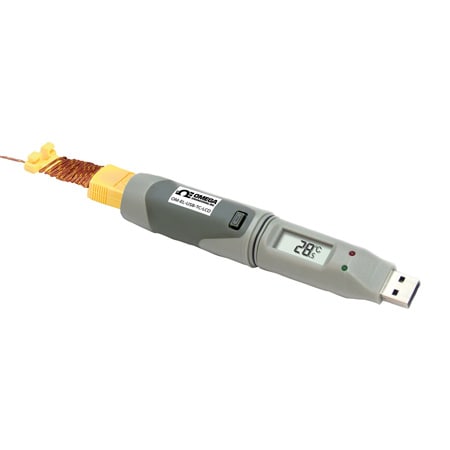
OM-EL-USB-TC-LCD-Logger
Enregistreur de données de thermocouple avec affichage LCD et interface USB
Modèles en stock
- Écran LCD à contraste élevé avec affichage de la température à 4 chiffres
- Accepte les thermocouples de type J, K ou T
- 2 seuils d'alarme programmables par l'utilisateur
- Indication d'état via des LED rouges et vertes
OM-EL-USB-TC-LCD-Logger
À partir de
C$
269.22
Modèles en stock


Aperçu du produit
- Remarque sur l'alarme Alarmes haut/bas
- Autonomie de la batterie jusqu'à 6 mois
- Taille et type de batterie 1/2 AA Li-ion
- Interface de données USB
- Type d'affichage Écran LCD
- Type d'affichage Remarque °C ou °F sélectionnable dans le logiciel
- Connexion électrique Connecteur miniature Sub-D femelle
- Hauteur 134.5 mm
- Type d'entrée TC
- Indicateurs LED 2 DEL
- Type de mesure Température
- Nombre de mesures 1
- Température de fonctionnement, max 40 °C
- Température de fonctionnement, min -10 °C
- Échantillons, max 32510
- Fréquence d'échantillonnage 1 Hz (1 mise à jour/seconde)
- Note sur la fréquence d'échantillonnage 1 s, 10 s, 1 min, 5 min, 30 min, 1 h, 6 h, 12 h (sélectionnable dans le logiciel)
- ID de série OM-EL-USB-TC-LCD-Logger
- Compatibilité logicielle Windows® XP/VISTA/7 et 8 (32 et 64 bits)
- Type d'approvisionnement électrique Batterie
- Précision de la température ± 1,0 °C
- Résolution de température 0,5 °C
- Type de capteur de température Thermocouple
- Poids 114 g
- Largeur 25.3 mm
L'enregistreur de données OM-EL-USB-TC-LCD mesure et stocke jusqu'à 32 510 relevés de température à partir d'un thermocouple de type J, K ou T qui se branche dans une prise thermocouple miniature femelle située à la base de l'appareil. L'enregistreur de données se branche directement sur le port USB d'un PC, aucun câble USB n'est nécessaire. Trois fonctions différentes sont disponibles sur l'écran : la température enregistrée la plus récente, la température maximale enregistrée et la température minimale enregistrée.
Le bouton-poussoir de l'enregistreur de données permet de passer d'une fonction à l'autre. L'état de l'enregistrement et de l'alarme de l'enregistreur de données est indiqué par des voyants LED rouges et verts clignotants. À l'aide du logiciel Windows fourni, l'utilisateur peut facilement configurer les paramètres initiaux d'enregistrement des données, notamment le type de thermocouple, la fréquence d'enregistrement, l'heure de démarrage, les réglages d'alarme haute/basse, le mode d'enregistrement et les unités de température souhaitées (°C ou °F), sélectionner le mode d'affichage qui comprend l'affichage éteint, allumé pendant 30 secondes après avoir appuyé sur le bouton, ou allumé en permanence, le roulement des données (permet des périodes d'enregistrement illimitées en écrasant les données les plus anciennes lorsque la mémoire est pleine) et également télécharger les données stockées. Les données téléchargées peuvent ensuite être représentées sous forme de graphiques, imprimées et exportées vers d'autres applications telles qu'Excel.
Logiciels & Pilotes


Afficher les évaluations et les avis
Rated 4 out of
5
by
DaveL from
Overall good piece
Good piece for the money. Manual wasn't that thorough, but there isn't much about the product to be thorough about, it's fairly straight forward for the most part. My only question was how, if possible, to stop the machine from running. There are three options on how/when to start recording, but it doesn't say anything about stopping it, unless you plug it in to the computer. If that is the only way to stop the testing, I feel that is a design flaw. Otherwise, great piece of equipment.
Date published: 2016-03-14
Rated 2 out of
5
by
Careful from
Convenient recorder but software dependent
Seems to be a nice data recorder, but you can’t do anything with it without loading the Omega software on your computer. If you work in a setting that requires IT approval for that sort of thing, or want to easily share it between multiple users, that could be problematic.
Date published: 2019-04-04
Rated 5 out of
5
by
Brittany from
works great
does everything it's advertised to do. support from Omega was also really appreciated - my IT department blocked the driver and Omega was able to show me where to find it so that I could install the software. these data loggers do the job and the software is very intuitive to use
Date published: 2023-07-25
Rated 5 out of
5
by
Stosh from
Great for concrete monitoring
We use these devices to monitor concrete temperatures during the first 5 days of curing. Great for saving heating costs when the internal temperature shows it is above the requirements
Date published: 2018-11-03
Hello. What is the battery type (industry code) of the 3.6V Lithium this device uses?
Thank you for your question. It is 1/2 AA 3.6V lithium battery (included)
Date published: 2023-07-07
Hello, does the device require for calibration? Thanks.
Thank you for your question. The logger is already calibrated.
Date published: 2024-10-30
Is there any document, that Ensure the logger is already calibrated?
Hello, thank you for your question. We will provide a certificate of conformance together with the order confirmation free of charge. If your company requires a NIST traceable calibration cert, then, you should order OM-EL-USB-TC-LCD-NIST instead.
Date published: 2024-11-01
Does this thermocouple logger display compensated temperature readings? The manual and product details do not clearly indicate whether cold junction compensation is performed via dedicated circuit when converting voltage to temperature.
Hello David
It is not mentioned in the specs, though generally for our thermocouple loggers / monitors, cold junction compensation is built in to the circuitry and performed when converting voltage to temperature.
Date published: 2019-08-14
Hello, I bought for of these devices and just realized that they don't work with Windows 10, 64-bits operating systems. Is there I can do to make it work? Thanks,
Hello Armando
Please send the request to das@omega.com so we can assist you further with this.
Thank you!
Date published: 2020-06-09
Hello. What type of thermocouple is included with the device (J, K, T)? And is it possible to choose between them?
Thank you for your question. Logger is supplied with type k t/c. You would have to purchase a different type separately.
Date published: 2022-01-25
How do you get it to stop flashing from an alarm state? It's currently double flashing red every 10 secs, and I know what that means, but how do I get it to go back to just flashing one green every 10 seconds?
Thank you for your question. We will require more information to help on this question, please email the DAS team at DAS@dwyeromega.com
Date published: 2024-06-05
Does it come with a calibration cert?
Thank you for your inquiry. It comes with a free certificate of conformance. If you need a calibration certificate, you would need to buy the OM-EL-USB-TC-LCD-NIST instead.
Date published: 2019-11-16